
A Discord welcome bot that greets every member for you
First impressions decide whether a new member stays. The Welcome & Goodbye module posts a custom greeting the second someone joins, sends them a private DM with your onboarding info, hands them a starter role automatically, and can require a math captcha before assigning the configured starter role. When people leave, a goodbye message keeps your community in the loop.
Start freeNo credit card · Free forever plan · Online 24/7
Everything is configured from a dashboard — pick or auto-create the welcome channel, write your messages, choose the auto-role. Click Save Settings to apply your changes; settings are saved per server. Welcome & Goodbye is free forever.
What you get
Custom welcome & goodbye messages
Post a greeting when someone joins and a farewell when they leave — in one channel or two. Save up to five welcome-message variants on Free (20 on Pro); the bot sends one at random per join and avoids repeating the previous variant while it is running.
Auto-role + DM welcome
Automatically assign a role to every new member and send them a private welcome message.
Captcha verification
Require a math challenge, limit wrong answers, or hold accounts younger than 1–30 days for staff review. This is a review workflow, not alt detection.
Optional staff review for new accounts
Enable “Hold young accounts for staff review”, choose 1, 3, 7, 14 or 30 days, and select a staff channel. A held member keeps the Unverified role when you have configured one and does not receive the verified role automatically. Staff see the account age and join time with Approve and, when the bot has Kick Members, Kick controls. Free includes one review channel; Pro can notify multiple channels and lets selected roles skip the account-age hold. It does not identify alt accounts.
What setup looks like
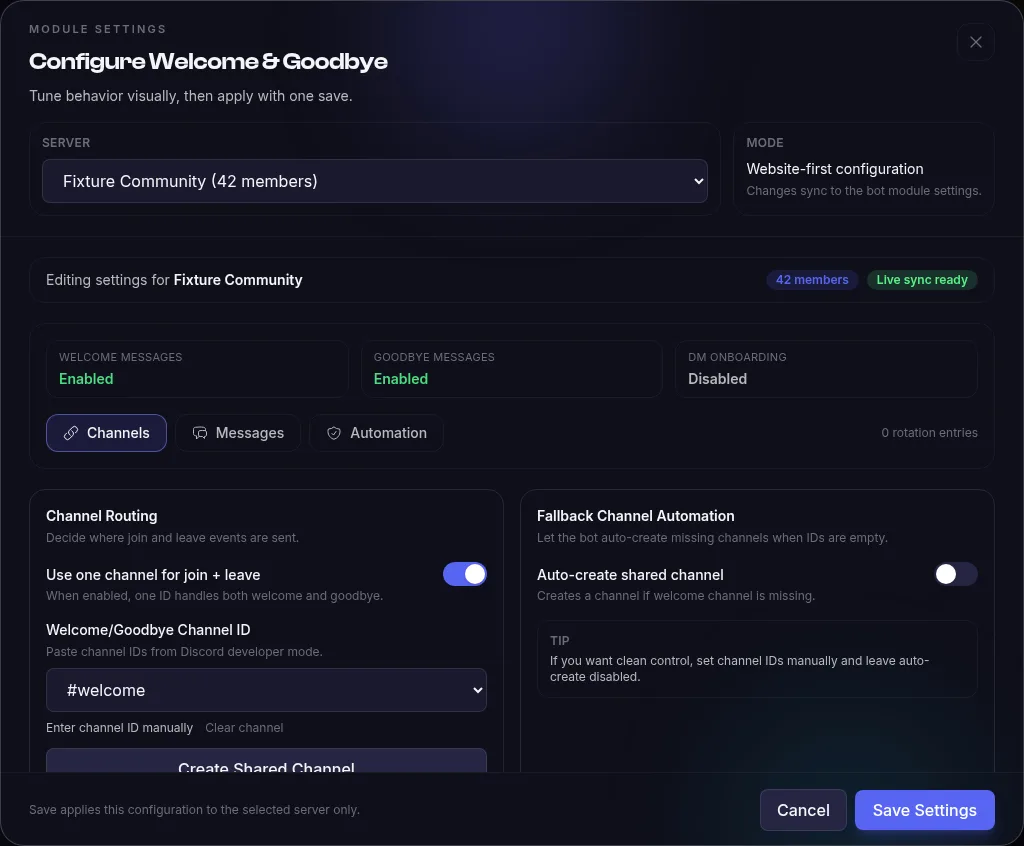
Open your bot in the dashboard, choose Modules, then configure Welcome & Goodbye and select the server. The Channels tab controls where join and leave messages go; Messages and Automation hold the greeting text, its filled-in previews, auto-role, captcha and optional staff-review settings.
Troubleshooting
Why is nothing posted when a member joins?
Check that Welcome Messages is enabled for the selected server and the bot can View Channel, Send Messages and Embed Links in the welcome channel. Enable Server Members Intent in the Discord Developer Portal so join events reach the bot. Bot accounts are skipped.
Where do I change the message and channel?
Open your bot’s Modules tab, configure Welcome & Goodbye and select the server. Use Channels for routing and Messages for the greeting text. Settings are saved per server, so check that you are editing the right one.
Why is the auto-role not assigned on join?
Enable the auto-role and choose a role below the bot’s highest role. The bot needs Manage Roles. If captcha is enabled, the normal join-time auto-role path is skipped; the verification flow handles the role after the challenge.
Who can run the preview commands?
The member running !testwelcome or !testgoodbye needs Manage Server (ManageGuild). These commands send a real test message using that server’s saved settings, so check the configured destination channel.
Example commands
| Command | What it does |
|---|---|
!welcome/welcome welcome | View the current welcome configuration for this server. |
!testwelcome/welcome testwelcome | Send a test welcome message so you can check the formatting. |
!testgoodbye/welcome testgoodbye | Preview the goodbye message without anyone having to leave. |
Full command list and configuration options in the Welcome & Goodbye documentation.
What does it cost?
Welcome & Goodbye is free forever — it is one of the 16 stock modules included with the free plan.
- 1 hosted bot, online 24/7
- 16 free-forever modules
- 10 custom commands
- No credit card required
- 3 bots
- All 44 modules
- AI Module Builder (50 credits/mo)
Frequently asked questions
How long does setup take?
Create your bot, enable Welcome & Goodbye and start it. In the dashboard, pick a welcome channel or create one, write your message, and optionally set an auto-role and captcha. Run !testwelcome to send a test greeting.
Is the welcome bot free?
Yes — Welcome & Goodbye is one of the 16 free-forever modules on the free plan (1 hosted bot, no cost). Start free. Pro is $9.99/month.
Can I set it up without coding?
Completely. The bot is generated and hosted for you; welcome messages, DM text, auto-roles and captcha are all toggles and text fields in the dashboard. Per-server settings mean one bot can greet differently in every server it's in.
Related modules
Add Welcome & Goodbye to your server today
Create your bot, toggle the module on, and it's live — hosted for you, no code, no downloads.
Start freeNo credit card · Free forever plan · Online 24/7