
Turn messages and optional voice time into XP
The Leveling module awards message XP, shows progress with !rank and ranks members with !levels. Optionally enable voice XP in the dashboard for each server: complete eligible voice minutes add to the same XP total, level and role rewards. Voice XP is off by default and included in Leveling on Pro, with no extra charge.
Start freeStart free. Pro is $9.99/month.
XP is tracked per server in your bot's own database and survives restarts and updates. Leveling is included in Pro ($9.99/mo — 3 bots, all 44 modules).
What you get
Message and optional voice XP
Choose 1–100 XP per complete voice minute (default 10). At least two non-bot, non-deafened members must share a regular voice channel. No XP while alone, deafened, in the server AFK channel or in a no-XP channel. Stage channels are excluded. Muted members can qualify; this does not detect speech. Message XP multipliers do not apply to voice.
Role rewards
Automatically grant roles at the levels you choose — Veteran at 10, Elite at 25, you decide.
Server leaderboard
A live top-XP leaderboard gives your regulars a reason to keep the streak going.
What it needs
- The bot needs View Channel, Send Messages, Embed Links and Manage Roles for Leveling’s messages, rank embeds and level-role assignment. It uses Message Content Intent.
- Level Roles can only assign roles the bot can manage. Message XP skips bots, direct messages and Channels With XP Disabled.
Setting it up
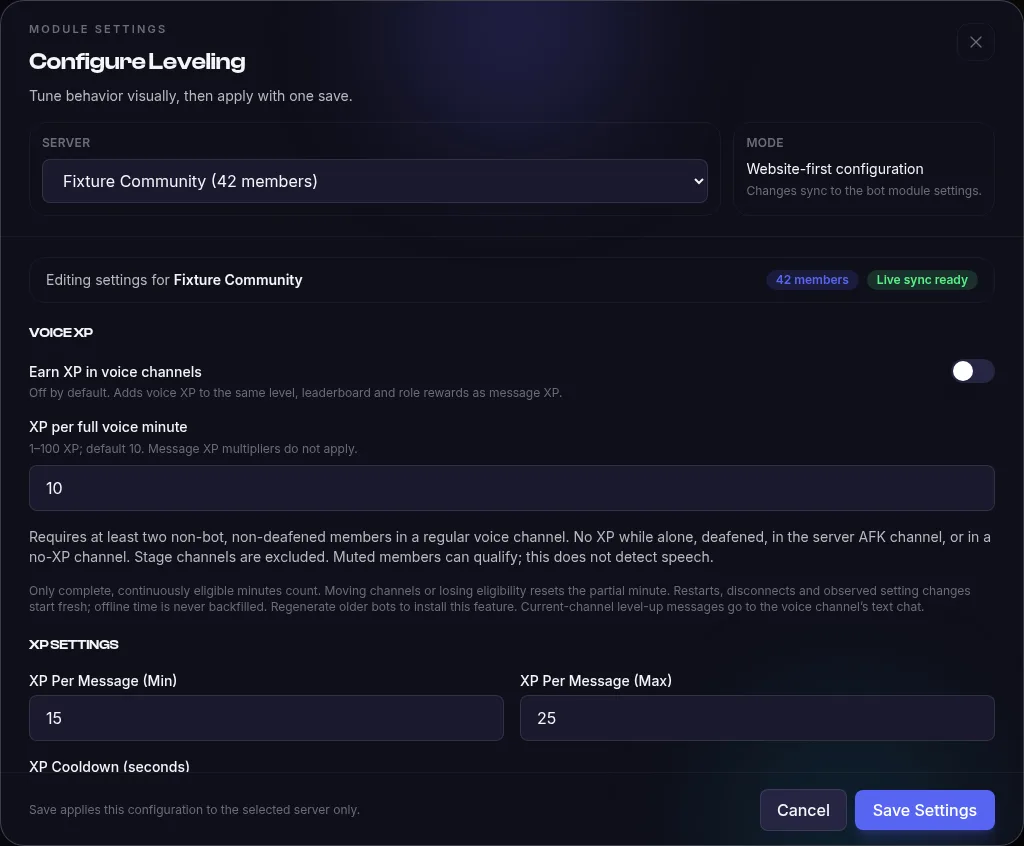
- Open Leveling in your bot’s Modules tab and select the server. In XP Settings, XP Per Message (Min) defaults to 15, XP Per Message (Max) defaults to 25, and XP Cooldown (seconds) defaults to 60.
- In Voice XP, Earn XP in voice channels defaults to off and XP per full voice minute defaults to 10. Turn it on only if your server should award voice activity.
- Level Up Announcements defaults to Announcement Mode: Current Channel. Level Up Message defaults to Congrats! {user} has reached **Level {level}**!; add Level Roles, XP Multipliers or Channels With XP Disabled only when you need them.
Example
With the default XP Settings, a non-bot member’s eligible message earns a random 15 to 25 XP. Another message from that member in the same server during the 60-second cooldown earns no message XP.
Limits and troubleshooting
Limits
- XP Multipliers can target a role or channel from 0.1x to 10x. For a member with more than one configured role multiplier, the module uses the highest one; message multipliers do not apply to voice XP.
- Voice XP counts only complete eligible minutes. At least two non-bot, non-deafened members must share a regular voice channel; AFK, Stage and Channels With XP Disabled do not qualify.
If it doesn’t work
- Messages are not earning XP: check XP Cooldown (seconds) and Channels With XP Disabled. Bots and direct messages do not receive message XP.
- Voice XP is not increasing: turn on Earn XP in voice channels, then check the members are in an eligible regular voice channel together for a complete minute.
- A level-up message or role is missing: check Announcement Mode and the selected channel. Confirm the role in Level Roles still exists and is manageable by the bot.
What setup looks like
Open your bot’s Modules tab, configure Leveling and select the server. Voice XP is optional and off by default. Scroll to XP Settings to choose the message XP range and cooldown, then review level-up announcements, no-XP channels and role rewards.
Troubleshooting
Why doesn’t every message earn XP?
Message XP is limited by a per-member, per-server cooldown; the default is 60 seconds. Messages from bots, direct messages and channels in the no-XP list are skipped. Check the saved XP cooldown and no-XP channels for that server.
Why is no XP awarded in voice?
Voice XP is off by default; enable Earn XP in voice channels for the selected server. At least two non-bot, non-deafened members must share a regular voice channel. Only complete eligible minutes count; AFK, Stage and no-XP channels do not qualify.
Why are there no level-up announcements?
Check the announcement mode and destination in Leveling settings. When announcements are disabled or the mode is Off, XP still increases and the module still checks role rewards, but no level-up message is sent.
Where do I change the XP range and cooldown?
Configure Leveling in your bot’s Modules tab, select the server and scroll to XP Settings. The message XP minimum, maximum and cooldown are saved per server. !levelsetup in Discord works with the same settings.
Example commands
| Command | What it does |
|---|---|
!rank | See your level, XP and progress to the next level. |
!levels | View the server's top members by XP. |
!levelroles | Configure the roles awarded at each level. |
Full command list and configuration options in the Leveling documentation.
What does it cost?
Leveling is included in Pro — Start free. Pro is $9.99/month.
- 1 hosted bot, online 24/7
- 16 free-forever modules
- 10 custom commands
- No credit card required
- 3 bots
- All 44 modules — including Leveling
- AI Module Builder (50 credits/mo)
Frequently asked questions
How do I enable voice XP?
Enable Leveling, open its settings, select the server and turn on Earn XP in voice channels. Save the per-minute rate. Regenerate older bots to install the feature. The bot uses its existing voice-state intent; no new privileged intent or bot voice connection is needed. Voice level-ups use the existing announcement settings; Current Channel posts in the voice channel’s text chat.
Is the leveling bot free?
Leveling is part of Pro ($9.99/mo — 3 bots, every module, AI Module Builder). Start free. Pro is $9.99/month.
Does voice time survive an interruption?
Earned XP persists in the bot database. Partial minutes reset when a member changes channels or loses eligibility, and after restarts, disconnects, long check gaps or observed voice-setting changes. Only complete, continuously eligible minutes count; offline time is never backfilled. Checks run every 15 seconds, so settings changes take effect on the next check. A setting changed off and on between checks may not be observed.
Related modules
Add Leveling to your server today
Create your bot, toggle the module on, and it's live — hosted for you, no code, no downloads.
Start freeStart free. Pro is $9.99/month.