
A Discord moderation bot that does the heavy lifting
Moderating by hand doesn't scale past your first hundred members. The Moderation module gives your team the full toolkit — kick, ban, mute, warn, purge, slowmode, channel lock — plus the part humans forget: consistency. Set a warning threshold and the bot automatically kicks, bans or mutes repeat offenders at exactly the same line, every time.
Start freeNo credit card · Free forever plan · Online 24/7
Every action lands in your mod-log channel with who, what and why, so the team stays accountable. Moderation is free forever on the free plan; deploy a hosted bot in about a minute with no code.
What you get
Complete mod toolkit
Kick, ban, mute, warn, purge, slowmode, lock — every command a moderator reaches for. Opt in to owner-only mass kicking with a 60-second confirmation; the owner, this bot and members above its role are protected.
Warning thresholds with auto-action
Pick how many warnings trigger an automatic kick, ban or mute. The bot enforces it consistently.
Mod-action logging
Every action is posted to your log channel so the whole team can see who did what, and when.
What it needs
- The bot needs View Channel, Send Messages, Embed Links, Kick Members, Ban Members, Moderate Members, Manage Messages, Manage Channels, Read Message History and Manage Roles for the moderation actions it performs.
- It uses Server Members Intent and Message Content Intent. Each command also checks the moderator’s matching Discord permission: for example, kick needs Kick Members, ban needs Ban Members, mute and warn need Moderate Members, and purge needs Manage Messages.
Setting it up
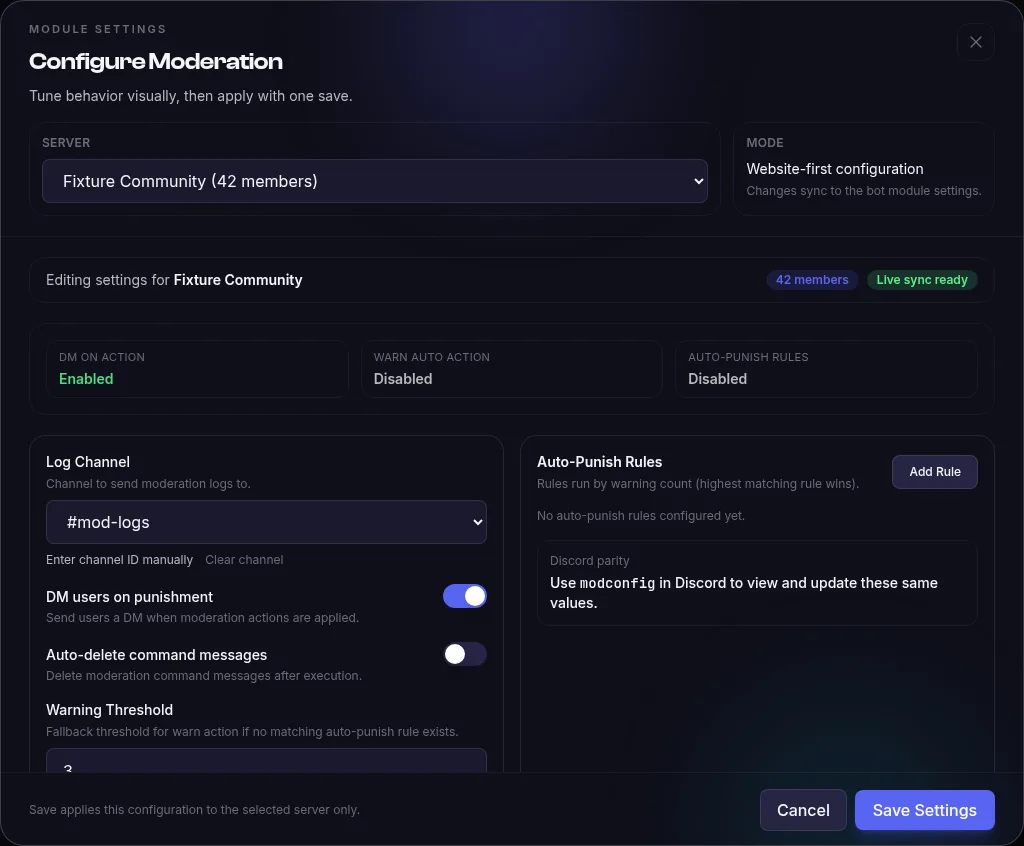
- Open Moderation in your bot’s Modules tab. Log Channel defaults to None (no explicit log channel), DM users on punishment defaults to on, and Auto-delete command messages defaults to off.
- Warning Threshold defaults to 3 and Action on Threshold defaults to None. Auto-Punish Rules have no rules by default; add rules when you want a warning count to trigger a mute, kick or ban.
- Allow mass kick defaults to off. When you deliberately enable it, only the server owner can run !masskick to create a preview, then confirm its single-use token within 60 seconds.
Example
With Warning Threshold set to 3 and Action on Threshold set to Kick, !warn @Maya Please follow rule 2 records Maya’s warning. When that is her third warning, the bot kicks her and records the automatic action.
Limits and troubleshooting
Limits
- A mass-kick preview includes only removable members: it excludes the server owner, the bot itself and members the bot cannot kick. The confirmation is consumed before the first kick.
- When more than one Auto-Punish Rule matches a warning count, the highest matching rule wins. If no rule matches, the Warning Threshold and Action on Threshold fallback can apply.
If it doesn’t work
- A moderation command is refused: give the moderator the command’s matching Discord permission and give the bot the permission too. Move the bot’s role above members it needs to kick, ban or time out.
- Mass kick is unavailable: turn on Allow mass kick, run it as the server owner and use the confirmation token before its 60-second preview expires.
- No moderation log appears: choose a Log Channel that the bot can view and send embeds in.
What setup looks like
Open your bot’s Modules tab, configure Moderation and select the server. Choose the log channel, decide whether to DM users, then review the warning threshold and auto-punish rules before saving.
Troubleshooting
Why can’t a moderator use a command?
Commands check the caller’s Discord permissions: kick requires Kick Members, ban requires Ban Members, mute and warn require Moderate Members, and purge requires Manage Messages. Grant only the permissions needed for the action.
Why can’t the bot kick, ban or time out a member?
Check the bot’s permission for that action and its role position relative to the target. The module checks whether Discord marks the target kickable, bannable or moderatable and refuses the action when that check fails.
Why does purge delete fewer messages than requested?
!purge accepts an amount from 1 to 100 and filters out messages older than 14 days before bulk deletion. If you mention a user, it also filters the fetched messages to that user; it does not keep searching older history to fill the count.
Where do I change logs and warning actions?
Configure Moderation in your bot’s Modules tab and select the server. The log channel, DM toggle, warning threshold and auto-punish rules are saved there. !modconfig in Discord reads and updates the same per-server settings.
Example commands
| Command | What it does |
|---|---|
!mute @user 10m Spamming | Time out a member for 10 minutes with a logged reason. |
/mod mute user:@user duration:10m reason:Spamming | Slash form of the mute command, with the member, duration and reason options. |
!warn @user Please follow rule 2 | Issue a warning; thresholds can auto-kick, ban or mute repeat offenders. |
/mod warn user:@user reason:Please follow rule 2 | Slash form of the warn command, with the member and reason options. |
!purge 50 | Delete up to 50 recent messages, excluding messages older than 14 days. |
/mod purge amount:50 | Slash form of purge, deleting up to 50 recent messages. |
Full command list and configuration options in the Moderation documentation.
What does it cost?
Moderation is free forever — it is one of the 16 stock modules included with the free plan.
- 1 hosted bot, online 24/7
- 16 free-forever modules
- 10 custom commands
- No credit card required
- 3 bots
- All 44 modules
- AI Module Builder (50 credits/mo)
Frequently asked questions
How fast can I get a moderation bot running?
Create an account, add your bot token, enable Moderation and click Start. Then choose a log channel and review warning actions in the dashboard. Discord permissions and role hierarchy must allow the actions you want to use.
Is there a free Discord moderation bot?
Yes. Moderation is one of the 16 free-forever modules — the free plan hosts 1 bot at no cost with no time limit. Start free. Pro is $9.99/month.
Do my mods need any technical skills?
No. Mods use plain commands like !kick, !ban and !warn inside Discord; you configure thresholds and logging from a web dashboard. The bot itself is generated and hosted by the platform — nothing to install or update.
Related modules
Add Moderation to your server today
Create your bot, toggle the module on, and it's live — hosted for you, no code, no downloads.
Start freeNo credit card · Free forever plan · Online 24/7