
A Discord reaction roles bot members run themselves
Stop assigning roles by hand. The Reaction Roles module posts a styled panel where members click an emoji to grab a role — pronouns, game pings, region, color roles — and click again to drop it. The interactive wizard walks you through channel, embed design, roles and emojis; publish when the preview looks right.
Start freeStart free. Pro is $9.99/month.
Each panel supports up to 20 roles with built-in or custom server emojis, and panels keep working through restarts. For colours, pronouns or regions, turn on single choice so a new pick replaces the member’s other panel role and reaction. Reaction Roles is included in Pro ($9.99/mo — 3 bots, all 44 modules).
What you get
Interactive setup wizard
Pick a channel, style the embed, add roles from a dropdown and pick emojis — then publish.
Up to 20 roles per panel
Use 25+ built-in emojis or your own server emojis; run as many panels as you need.
Persistent, single-choice panels
Panel mappings are saved through restarts. For colour, pronoun or region choices, a new pick can remove the member’s other panel roles and reactions.
What it needs
- The bot needs View Channel, Send Messages, Embed Links, Manage Roles, Read Message History and Add Reactions to create and maintain reaction-role panels. Exclusive panels also need Manage Messages to remove a member’s previous reaction. It uses Server Members Intent and Message Content Intent.
- Roles offered by the wizard must be below the bot’s highest role. The wizard excludes @everyone, integration-managed roles and roles already added to that panel.
Setting it up
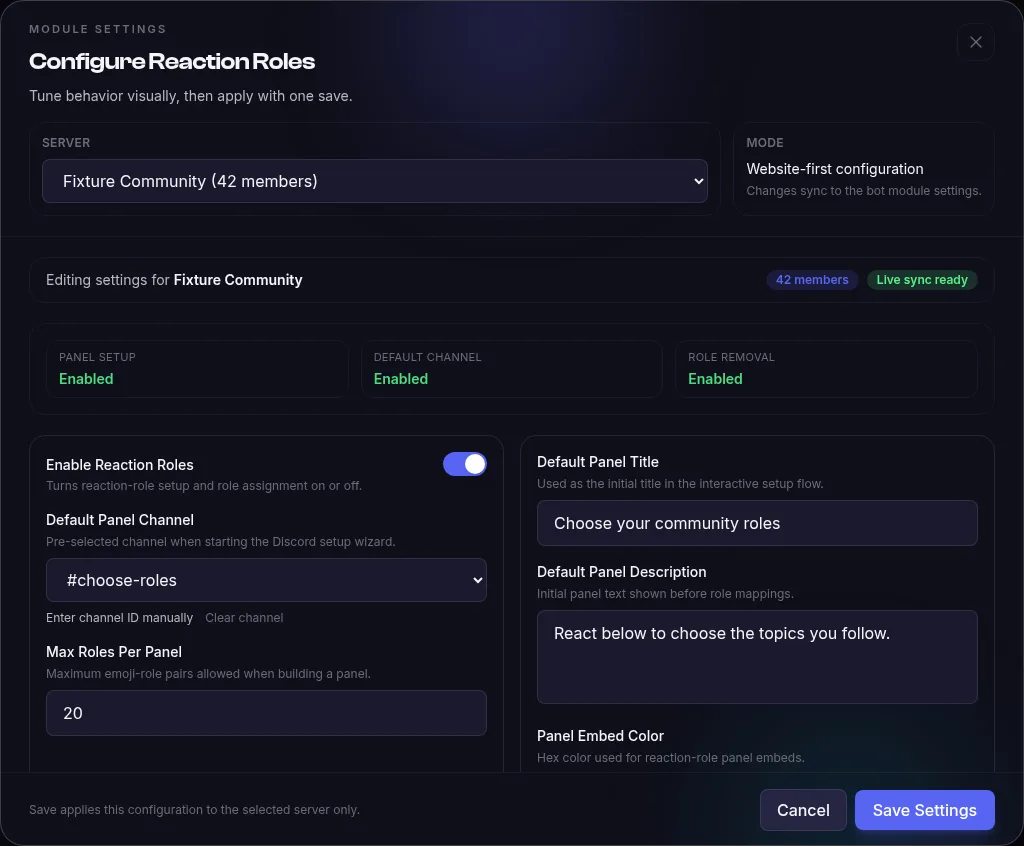
- Open Reaction Roles in your bot’s Modules tab and select the server. Enable Reaction Roles defaults to on, Default Panel Channel defaults to None (prompt every time in Discord setup), and Max Roles Per Panel defaults to 20.
- Default Panel Title defaults to React to get your roles!, Default Panel Description defaults to Click on the reactions below to assign yourself roles., and Panel Embed Color defaults to #5865F2.
- Allow Role Removal On Reaction Remove and DM On Role Change both default to on. Members Can Pick Only One defaults to off and applies to new panels. Run !reactionrole to choose the channel, map roles to emojis, preview and publish the panel.
Example
For a color-role panel, map 🔴 to Red and 🔵 to Blue, turn on Members Can Pick Only One, then publish it. A member choosing 🔵 receives Blue while Red and its reaction are removed. Use !rrmode <messageId> on or off to change one published panel. When it is off: A member who reacts with both emojis receives Red and Blue independently.
Limits and troubleshooting
Limits
- Max Roles Per Panel accepts 1 to 20 emoji-role pairs. The setup wizard stops offering new roles once the saved maximum is reached.
- Removing a reaction removes only its mapped role when Allow Role Removal On Reaction Remove is on. Turning that setting off keeps the role after the reaction is removed.
- Single-choice is stored per panel. The dashboard toggle supplies the default for new panels; existing panels remain unchanged until you use !rrmode <messageId> on. Removing another member reaction also needs the bot’s Manage Messages permission.
If it doesn’t work
- A role is missing from the wizard: move the bot’s highest role above it, then check that it is not @everyone, integration-managed or already on the panel.
- A reaction does not add a role: make sure Enable Reaction Roles is on and give the bot Manage Roles. Check that the reaction is on a published panel with that emoji mapped to the role.
- A removed reaction leaves the role in place: turn on Allow Role Removal On Reaction Remove for the selected server.
- Single-choice reactions stay visible: give the bot Manage Messages as well as Manage Roles. The role swap still follows Discord’s normal role hierarchy rules.
What setup looks like
Open your bot’s Modules tab, configure Reaction Roles and select the server. Save the default panel channel, title, description and role-removal behavior. Then use !reactionrole in Discord to pair roles with emojis and publish or edit a panel.
Troubleshooting
Why is a role missing from the setup wizard?
The wizard only offers roles below the bot’s highest role. It excludes @everyone, roles managed by integrations and roles already added to that panel. The bot also needs Manage Roles to assign the chosen roles.
Why does removing a reaction leave the role in place?
Check Allow Role Removal On Reaction Remove in the server’s Reaction Roles settings. If it is disabled, the removal handler intentionally keeps the role. Reaction Roles must also remain enabled for reaction changes to be processed.
Does saving dashboard defaults create a panel?
No. The dashboard saves per-server defaults such as the channel, panel text, role-removal toggle and single-choice default for new panels. Run !reactionrole in Discord to choose emoji-role pairs and publish a panel. !rrsettings reads and changes defaults; !rrmode changes one existing panel.
What does the setup command require?
The member running !reactionrole needs Manage Roles. For prefix commands, enable Message Content Intent in the Discord Developer Portal. This module also declares Server Members Intent; enable the intents requested by your bot’s checklist.
Example commands
| Command | What it does |
|---|---|
!reactionrole | Launch the setup wizard: channel, embed style, roles and emojis. |
!rradd #roles 12345 🎮 @Gamer | Quick-add another emoji-role pair to an existing panel. |
!listroles | List every reaction role panel in the server. |
Full command list and configuration options in the Reaction Roles documentation.
What does it cost?
Reaction Roles is included in Pro — Start free. Pro is $9.99/month.
- 1 hosted bot, online 24/7
- 16 free-forever modules
- 10 custom commands
- No credit card required
- 3 bots
- All 44 modules — including Reaction Roles
- AI Module Builder (50 credits/mo)
Frequently asked questions
How long does reaction roles setup take?
After starting your bot, use !reactionrole to choose the channel, write the embed, pair each role with an emoji, preview and publish. The wizard also lets you edit an existing panel’s pairs.
Is the reaction roles bot free?
Reaction Roles is a Pro module ($9.99/mo for 3 bots and all 44 modules). Start free. Pro is $9.99/month. The free plan itself includes 1 bot with 16 free-forever modules.
Do I need to code anything?
No. The wizard handles panel creation inside Discord, the platform generates and hosts the bot 24/7, and panels persist in the bot's own database. While the bot is online, reactions use the saved mappings and the server’s role-removal settings.
Related modules
Add Reaction Roles to your server today
Create your bot, toggle the module on, and it's live — hosted for you, no code, no downloads.
Start freeStart free. Pro is $9.99/month.